How Payment Authorization Protects Advertisers Buying Stream Ads
Authorize, capture, void: what happens to your money between checkout and the moment a streamer says yes.
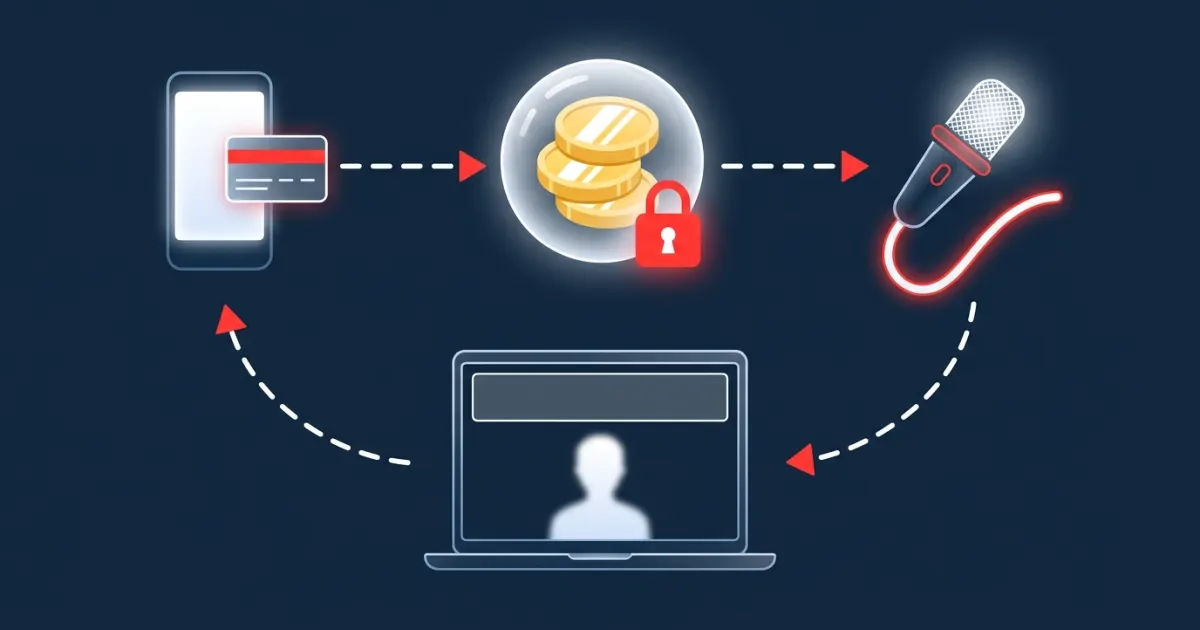
Payment authorization protects advertisers by separating the promise to pay from the payment itself. When a stream ad is booked with an authorize-and-capture flow, your money is only put on hold at checkout. It is captured after the streamer accepts your ad, and the hold is voided if they turn it down or never answer. You pay for ads a streamer has said yes to, not for ads that were rejected or ignored.
Key takeaways
- An authorization is a hold, not a charge. A capture is the actual charge. A void cancels the hold before any money moves.
- PayPal's developer docs say an authorization is valid for 29 days, and they recommend capturing within the 3-day honor period, when success rates are highest.
- For stream ads, authorization lets the streamer review your banner before you are charged.
- Voiding a hold is cleaner for buyers than a refund: there is no charge to reverse and no refund to wait for.
- On AD on Live, the capture happens when the streamer approves. A rejection, or 3 days without a response, voids the hold.
The problem: paying before anyone agrees to run your ad
Buying an ad directly from a live streamer has a built-in trust gap. If you pay first, you carry the risk: the streamer might decide your product doesn't fit their channel, might not reply for a week, or might not reply at all. Then you're chasing a refund. If the streamer runs the ad first and invoices later, they carry the risk of not getting paid.
Small advertisers feel this most. Many channels are run by one person with no sales team and no contract templates. Many advertisers are small too: an indie game studio, a local shop, an app maker. Neither side wants lawyers involved over a 15-minute banner slot.
Authorization closes most of that gap. The buyer proves the money is there, the seller gets time to review the ad, and nothing is final until the seller accepts.
Authorize, capture, void: the three verbs explained
PayPal's guide for developers describes its checkout as supporting "a 2-step authorize and capture payment model". In plain words:
| Step | What happens to the buyer's money | Everyday comparison |
|---|---|---|
| Authorization | A hold is placed on the payment method for a set amount. Nothing is charged yet. | A hotel holds an amount on your card at booking |
| Capture | The held amount, or part of it, is charged and paid to the merchant. | Checking out of the hotel |
| Void | The hold is canceled before capture, so the funds are released. | Canceling a reservation before you arrive |
| Refund | Money that was already captured is sent back. | Getting your money back after you've paid |
| Reauthorization | A new hold is placed after the honor period to confirm funds are still there. | Re-confirming a long reservation |
PayPal's own walkthrough of the flow is short: you authorize the payment, "a hold is placed on the payment method until you are ready to capture payment," and on capture "the payer's payment method is charged" (PayPal Developer). The Payments API reference describes a void as an operation that "voids, or cancels, an authorized payment".
The hotel comparison isn't ours. PayPal's help center uses it, noting that authorizations are sometimes for a future payment, "for example a hotel stay or reservation" (PayPal Help). The same page explains what you'll see as a buyer: your account will show a "Pending" authorization until the merchant captures the payment, and then the payment shows as "Complete."
One more rule matters for budgeting. PayPal's delay-capture guide says merchants "can capture any amount up to the authorized total", so a capture can't exceed the authorization it comes from.
How long does a PayPal authorization last?
As of 2026, PayPal's developer documentation describes two time windows:
- Validity: "An authorization places a hold on the funds and is valid for 29 days" (PayPal Developer, updated September 11, 2026). After 29 days, the authorization expires automatically and the merchant would need a new order to charge the customer (PayPal Developer).
- Honor period: "After a successful authorization, capture the payment within the 3-day honor period" (PayPal Developer). The delay-capture guide adds that "the highest success rate is within the first 3 days (the honor period)" (PayPal Developer).
PayPal's consumer help page gives the same picture in softer terms: orders and authorizations "typically expire in 29 days," and the honor period "is typically three days" (PayPal Help).
| Time after checkout | What PayPal's docs describe |
|---|---|
| Days 0–3 | Honor period: captures are most likely to succeed |
| Day 4 onward | Merchant may reauthorize to confirm the funds are still available |
| Up to day 29 | Longest validity described in PayPal's guides (can be shorter by region) |
| After expiry | Hold ends; charging the buyer needs a new order |
About reauthorization: PayPal's guides don't agree on every detail. The standard checkout guide says a merchant can issue multiple reauthorizations within the 29-day period, each restarting a 3-day honor period. The separate "Extend an authorization" guide (updated June 4, 2026) says each authorization can be reauthorized only once, for up to 115% of the original amount in most regions. That guide also lists authorizations as "valid for 3 days in the US and up to 29 days in most other regions" (PayPal Developer). The safe takeaway for buyers: an authorization is meant to be settled quickly, and the first three days are the window all of PayPal's guides agree on.
Why a void is better for buyers than a refund
If you prepay for an ad that never runs, you have to wait for a refund, and refunds take time. PayPal's help center lists typical refund times by funding source (PayPal Help):
- PayPal balance: back in your balance the same day.
- Bank account: usually up to 5 business days.
- Debit card: generally up to 5 business days, but some refunds may take up to 30 days depending on the card company.
- Credit card: it can take one to two billing cycles to appear on your statement.
A void skips all of that because nothing was charged. PayPal's guidance to merchants says it plainly: if you can't fulfill an order, "void the authorization immediately to release customer funds". The same page tells merchants to "inform customers that their payment is authorized, but not yet charged."
What authorization does and doesn't protect
Authorization is a payment safeguard, not a performance guarantee. Be clear about where it helps.
It protects you when:
- The streamer rejects your ad because of the product, the creative or the destination.
- The streamer doesn't respond, as long as the platform voids holds that go unanswered.
- You want the seller to review the ad before any money moves.
It does not:
- Guarantee results. A captured payment buys the slot, not a number of sales or scans.
- Make the money spendable elsewhere while it's on hold. PayPal describes authorization as reserving funds on your payment method, so budget for it as if it were already spent.
- Guarantee the capture itself. PayPal notes that "payment capture is subject to risk and money availability" (PayPal Developer), and it recommends capturing within the honor period, when success rates are highest.
How AD on Live uses authorization
AD on Live is a self-serve marketplace where streamers sell short, time-based banner slots on their stream overlay. Anyone can book one without creating an account. The payment flow is built on PayPal authorization:
- Checkout. You open the streamer's booking page, enter your email, add an optional destination URL, pick 1 to 60 minutes, upload and crop your banner, and pay with PayPal. The payment is authorized, not captured.
- Review. The streamer gets an email that a new ad is waiting. They approve or reject it from the web dashboard or the desktop app. Approving only works while the streamer is on air (their overlay is online or they've started a live session in the desktop app).
- Approve → capture. When the streamer approves, the funds are captured and the ad starts right away (or right after the ad already running) and runs for the minutes purchased. If a streamer has turned on auto-approve and is on air when you book, the capture happens right away.
- Reject → void. If the streamer rejects the ad, the authorization is voided and the hold is released. You're never charged for a rejected ad.
- No answer → void. If the streamer doesn't respond within 3 days, the authorization is voided automatically.
You get an email at each stage: a receipt, an approved/live notice or a rejected/voided notice, and a completion summary with your click count. The 3-day approval window is the same length as PayPal's honor period, so an approval, and the capture that comes with it, happens while the authorization is at its freshest.
Example: a channel charges $2 per minute and you book 15 minutes. At checkout, PayPal places a $30 hold. If the streamer approves on day two, the $30 is captured; with AD on Live's standard 20% platform fee, the streamer keeps $24 (founding partners pay 10% in their first year). If the streamer rejects the banner, the $30 hold is voided and you're not charged.
For the pricing side of time-based slots, see pay-per-minute advertising. To see what streamers check before they approve, read how streamers review and approve ads.
A quick checklist before you pay
- Make sure your PayPal funding source can cover the full hold.
- Look at a few of the streamer's recent streams so your ad fits the channel. That's the easiest way to avoid a rejection.
- Prepare a banner that reads well on a live stream (banner design guide).
- Add a destination URL you control, ideally with UTM tags so you can measure visits.
- Keep the receipt email. A "Pending" entry in PayPal is the authorization, not a charge.
- If you're comparing other ways to buy, see how to buy an ad on a Twitch or YouTube stream without an agency.
The bottom line
Authorize-and-capture turns a stream ad purchase into something both sides can trust: the advertiser's money is held, not handed over, until the streamer says yes, and a void cleanly releases it if they don't. If you want to test live stream advertising without contracts, without an account and without paying for ads that get turned down, see how AD on Live works for advertisers or walk through the full flow on How it works.
This article explains how payment authorization generally works. It is not financial or legal advice. Check PayPal's current documentation for the rules that apply to your account and region.
Frequently asked questions
What is the difference between authorizing and capturing a payment?
Authorizing places a hold on the buyer's funds for a set amount without completing the charge. Capturing completes the charge and moves the money to the merchant. PayPal describes this as a 2-step authorize-and-capture payment model.
How long does a PayPal authorization last?
PayPal's developer documentation says an authorization is valid for 29 days and recommends capturing within the 3-day honor period, when capture success rates are highest. PayPal's reauthorization guide notes that validity periods can vary by region.
What does it mean when an authorization is voided?
A void cancels an authorized payment before it is captured. PayPal advises merchants to void an authorization they cannot fulfill so the customer's funds are released. Because nothing was charged, there is nothing to refund.
Am I charged if a streamer rejects my ad on AD on Live?
No. AD on Live authorizes your PayPal payment at checkout and captures it only when the streamer approves, or immediately if the streamer has auto-approve on and is on air when you book. If the streamer rejects the ad or does not respond within 3 days, the authorization is voided and the hold is released.
Why does my PayPal account show a pending payment after I book an ad?
PayPal's help center explains that your account shows a "Pending" authorization until the merchant captures the payment. After capture, the payment shows as "Complete."
Sources
- developer.paypal.com/docs/checkout/standard/customize/authorization/
- developer.paypal.com/checkout/delay-capture
- developer.paypal.com/checkout/extend-authorization
- developer.paypal.com/docs/api/payments/v2/
- paypal.com/us/cshelp/article/what%E2%80%99s-an-%E2%80%9Cauthorization%E2%80%9D-and-can-i-c...
- paypal.com/us/cshelp/article/where-is-my-refund-help130
Advertise on a live stream
Book a sponsor slot by the minute. You're charged only if the streamer approves your ad.
See how it works